This is a first post in a series explaining how to use WordPress Categories to better organize and monetize your site.
This post describes how to create the WordPress category and put a post a category; in WordPress this also “tags” the post. There are many, many reasons a blogger should use Categories and Tags, but I’ll talk more about those advantages later. In this post, I’ll explain how to:
- Put a Post in a Category that Already Exists
- Create a Category.
Place a Post in a WordPress Category
To put a post in a category that already exists, begin writing a post. While you are writing, your browser screen will look sort of like this:
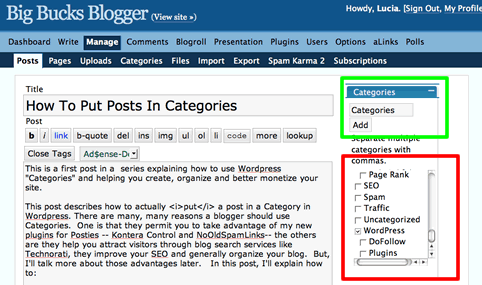
Look to the right hand side of the page; I’ve outlined the list of categories I’ve already created with a red box. Find an appropriate category for the post and check the box to the left of the category title. The post I am currently writing is about “how to use WordPress Categories.” So, I want to put that in the “WordPress” category which I created some time ago.
If you have good eyesight, you can see I checked “WordPress”. When I “save” my post, it will be placed in the WordPress Category! Done! (more…)
