Archive for June, 2007

Kontera Control Plugin

Wednesday, June 27th, 2007

Do you need to keep Kontera ads out of sponsored posts? Want to keep them off new posts? Willing to be a guinea pig?

If you act today, you can be the first to download Kontera Control, my new WordPress plugin. (Of course, it’s beta.)

It will let you:

  • Keep Kontera ads out of new posts for the number of days you specify. I’m planning on setting this to 3 days to mostly keep them off the index.php page.
  • Keep Kontera ads out of one user specified category forever. I’m planning to use this for Sponsored programs that require you to maintain posts unchanged forever (like Sponsored Reviews or Review Me.)
  • Keep Kontera ads out of one user specified category for a specified number of days. I’m planning to use this for programs that require you to keep the posts unchanged for a finite number of days- like Pay Per Post which requires posts be maintained 30 days. (I’m planning to set ads to display after 60 days.)
  • Decide whether to add Kontera Ads to comments at all, and if you do, to only include the Kontera ads after a specified number of days. I’m let the Kontera ads show after 5 days.
  • Only loads the Kontera Javascript when Kontera ads are to be shown. (This speeds loading but also prevents accidental appearance of ads!)

The plugin also keep Kontera ads out of the sidebar and blog header. Later on, I’ll explain some “features” associated with using the “konafilter” and “konabody” tags. Read it and you’ll learn why you do want to use my plugin to avoid accidentally showing a Kontera ad in a blog post. (In the process, I’ll explain how you may wish to hand code in Blogger or any blogging platform that can’t use my plugin.)

Download Kontera Control and upload to your plugins folder. Activate. Visit Options=> Kontera Control and set your options. (Detailed directions are now available: How to use Kontera Control.).

Once this is going, you can make more money using my new plugin!


Update: Thank you Judy for your questions! I wrote two articles to help Wordpress Newbies to figure this out.
Adsense Deluxe: Simplifies Your Life

Tuesday, June 26th, 2007

Did you know there is a WordPress plugin that makes it easy to insert Google Adsense of Yahoo! Publisher Network ads into your blog? It’s called Adsense Deluxe. Once you install it, you can insert ads without fiddling with long javascipt codes.

Instead, you will be able to include ads in your blog posts by using a pull down menu to insert tags that look like this: <!-adsense#200by200->

Wordpress will then substitute an ad in a Google format corresponding to that particular tag.

If you’d like to insert an ad somewhere in your blog template outside posts, you insert this snippet of PHP: <?php adsense_deluxe_ads(’Ad_Name’); ?>

Much easier than adding a bunch of javascript! (more…)

NoSpamLinksPlugin Version 1

Monday, June 25th, 2007

UpdatedThe “No Old Spam Links” Plugin is available. I’m using it on for blogs with various WP 2.2 and 2.1 versions. One other blogger is using it, so it’s still Beta. I’ll call it Alpha after I get feedback.

The “No Old Spam Links Plugin” will let you:

  • Add “nofollow” to all backlinks any domain on a blacklist. Links remain “follow” for 10 days after you publish the post and become “nofollow” afterwards. The “nofollow” is applied in posts and comments. Example: If you blacklist “evildomain.com”, links to “evildomain.com” will be blacklisted after 10 days.
  • Specify one white list “all links dofollow” category which overrides the blacklist.
  • Specify an “all no follow” category that adds no follow to all links after a specified number of days.

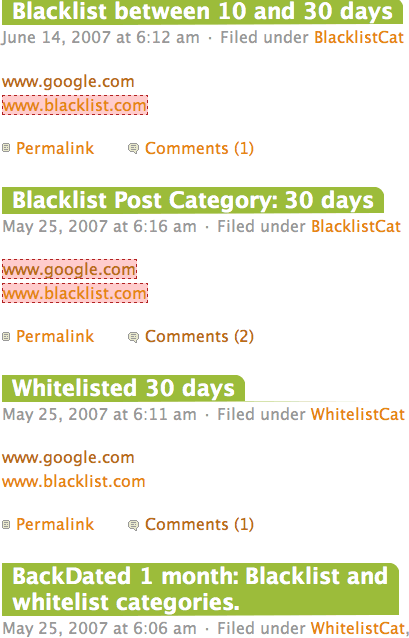
You can see examples of how this works on new posts, old posts etc. at Big Bucks Test Blog.

Recommended uses:

  • Blacklist domains that used to be good and which you used to link, but later turned evil.
  • Place all link exchanges in the whitelist category.
  • Place whatever you want in the “all nofollow” category for whatever reason you may wish and set the date. It can be useful to protect your page rank when posting for long link trains. Be careful using this with sponsored posts: you must avoid violating any TOS for your program.

To use the plugin: Download NoOldSpamLinks Plugin. Unzip. Upload to your plugins folder. Activate.

Visit the Options=>NoOldSpamLinks on your dashboard and add domains you wish to blacklist, the category you wish to white list and the category you wish to “nofollow” after some period of days.

Enjoy. “No Old Spam Links” Plugin

(Note: 7/25/2007. I have discovered that one of the functions called is new to PHP 5. Many servers have PHP 5 installed; however some still use PHP4. If your host doesn’t used the newer PHP 5, you will get an error telling you str_ireplace() is missing. I found a fix for this. )