StumbleUpon drives a lot of traffic, and the traffic, and as DoshDosh reports, StumbleUpon traffic is generally focused and of great quality. So, it’s worth trying to discover how to generate plenty of traffic without spamming the site and getting banned.
Naturally, I’ve been reading a large number of “to do” tips and I’ve hit on five I’m going to try over the next month. I’ve selected these because they are easy, and not too time consuming.
I encourage you to try them too.
All require you to join StumbleUpon and to make things easy, you should install the StumbleUpon toolbar which you can download at StumbleUpon’s main page — look in the right sidebar. After you install, you will see an bar whose left edge looks like this:
Ok, so now what am I going to do? Here’s my list, I encourage you to give it a try too:
- Stumble people who link you! Do this by regularly visiting your dashboard, visiting their blog, and then clicking the “thumbs up” icon in the Stumble toolbar. If you are the first to Stumble, you will have a brief form to fill out. It’s quick- just do it.
Why do this? When you Stumble someone else, they get traffic. If they linked you, some of those visitors will click the link to your post. (I tried this: it worked.)
- Link and befriend bloggers who Stumble your posts! Why? Because bloggers tend to read posts that appear in their trackbacks. You can’t make them like your post or Stumble you. But remember, these are people who do Stumble what they like. So, it’s worth a shot!
(If you want to read more about gaining visibility with the “right” Stumblers, read My StumbleUpon Friend.
- Stumble your friend’s and commenter’s blog & Stumble posts you link. Do watch for your friends’ best posts- because other Stumblers will trust you more and your Stumble profile will improve more if you give a thumbs up to good posts.

Why do this? Well, your friends and commentors visit your blog, right? Showing them the power of Stumble will make them want to join and get Stumbling too.
When they do, encourage them to install the toolbar. Make them your “Stumble” friend. (You tell me your profile in comments, I’ll befriend you. )Give them your Stumble profile link. Hopefully, they will make you their StumbleUpon friend and will Stumble your best posts (especially when you link them.) Then, you will both increase your reputations with Stumble and get more traffic. (To read more about how Stumble rates stumblers, visit Stumble Upon Mathematics.
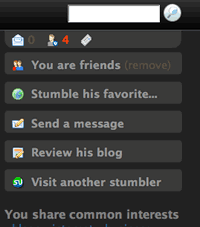 Thank people who stumble you. This tip comes from Liz of Successful Bloggers. How? Find the white conversation balloon in the Stumble toolbar; (it’s on the right in the image I show.) Click that- you’ll see who stumbled you. Next, find the “meet so-and-so” link. Click to open their profile.
Now, look at the right sidebar. See the “Send a message?” Click that. Then send a message and thank them!
Why? People who stumble tend to stumble a lot. Thanking them is gracious. It also may make them remember to visit your blog again and Stumble you again.
- After someone Stumbles you, go stumble a post they stumbled! How? Once again, visit the Stumbler’s profile and look at the right sidebar. See “Stumble his favorites?” Click that.
Read a few posts- use the “stumble” icon on the far left of your Stumble toolbar to scan past the ones you don’t like. Within 5 posts, you’ll probably find one you like. So, give it a thumbs up! You are done.
Why do this? Because a person’s stumble profile is strengthened when they posts they Stumble are given thumbs up by others — including you. So, if people who like your posts develop good reputations, you get more traffic when they stumble you.
Those are the tips!
How about adding friends and fans?
Of course I’m going to add friends and fans etc. But right now, I don’t know everyone’s Stumble profile name. So, I’m going to concentrate on doing things that will make others discover my profile and want to become my fan.
To do that, I need to Stumble others, attract the attention of people who already Stumble, then cross my fingers and hope they like my posts.)
Will I be reading more tips? Absolutely. This is just a start- but it’s easy. With luck, I’ll accumilate stumbles, friends and fans as I learn how to better use StumbleUpon. (And you will too.) Maybe we’ll both soon find ourselves reciting An Ode to StumbleUpon.