Dear New StumbleUpon Friend: Now, I want to read and Stumble your blog posts. But I need to find your blog first, and you don’t make it easy for me to find your blog. Please plaster your blog url in as many places as possible in your Stumble profile so I can find you even if it’s 6 am and I’m brain dead. Now, even a hurried, brain dead blogger who likes to visit blogs of people who “discovered” her posts can find your blog. (And she likes to Stumble. So, you’ll get traffic.
You “discovered” my post. Thanks!How to make it easy for anyone to find your blog on your Stumble Profile.
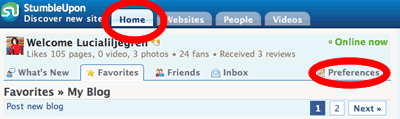
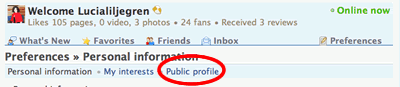
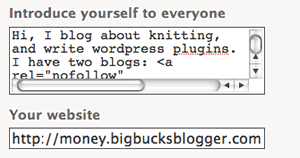
Add content that describes yourself and — this is important- include the links to your blogs both in the “introduce yourself” box and the “your blog” box.  )
)
Archive for October, 2007
Upgrading a Blogger Blog to WordPress for Beginners; Lesson II
Tuesday, October 2nd, 2007This the second article in a series explaining how to upgrade your Blogger blog to WordPress running on your own domain. Yesterday I described preliminaries, like getting a hosting account and a domain name. Today, I’ll discuss how to actually get your “site” up. Tomorrow, I’ll describe how install WordPress. Afterwards, I’ll finally get around to telling you how to import your Blogger blogs!
Now, when I write “how tos”, I like to explain both the goal and give the step-by-step instructions. Some readers like to read the goal first, and the step-by-step instructions second. Some like the revers. Today, I’ll describe the goal first.
What are you trying to actually accomplish with today’s “how to”?
Remember yesterday, I told you to you set up a hosting account, register a domain and arrange the DNS pointers to “find” your domain which, for the purposes of discussion we’ll call, “myblogdomain.com” at your host. Then, I said to wait 24 hours. So, you waited.
Now, I bet you think you can just enter “http://myblogdomain.com” into your browswer, and you’ll find something. Well… probably not. Or at least, you won’t find anything useful. Why not? I’ll explain using an analogy.
Think of your hosting account as providing you a big pc (aka ” server”) that is located “over there”. My hosting account is Dreamhost, which means my “big PC” (aka “server”) happens to be in California. (more…)
Pips Spam
Tuesday, October 2nd, 2007Look what I found in the Akismet bin “Big Bucks Blogger”:
Pips | [email protected] | pipsnet-technology.com | IP: 78.51.114.143
This is an interesting blog. I´m here for the second time and find every day new interesting details.
I also found it in in Akismet for “The Knitting Fiend”:
Pips | [email protected] | pipsnet-technology.com | IP: 78.51.114.143
This is an interesting blog. I´m here for the second time and find every day new interesting details.
Pips sure is an interesting name for a spammer who visits blogs twice.
When I searched “This is an interesting blog.” “time and find every day new interesting details”, I discovered that Pips has hit lots of interesting blogs.
If you’ve been hit, you may want to delete any comments left by “Pip” of “pipsnet-technology.com”. Or at least make them nofollow. L’s Linky Love would would let you follow most your links, while nofollowing Pips. After all, he never visits three times.