Tip: The best template layouts show the most important content above the fold. Examine your blog and edit to make sure yours does that.
Define “Above the fold”.
There is no firm definition of “above the fold”. People with larger screens see more; people with smaller screens see less. I consider “shows at the top of the WordPress preview pane without scrolling” to be “above the fold.”
Here’s a screen shot of one of my recent blog posts:
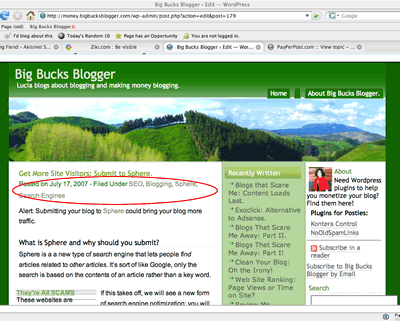
Does the important stuff show?
Each blogger has their own opinion about what’s “important.” At my blog, I think showing at least a few lines of content is very important: People should not need to scroll to read the first few lines of content. I think showing adSense is somewhat important: If the first few lines of content don’t interest the reader, I’d like them to click the ads!
Viewing that post, I decided that I needed to shift the Google ads up a bit.
I also saw something I consider unimportant showing in my content area: both the date or categories will fulfill their purpose if they appear below the fold.
If I shift those, there may b some hope my content will capture a new visitor’s interest or, failing that, cause them to click on a pay per click ad before they need to decide whether to scroll or hit the back button.
Could I Make Additional Improvements?
Of course! There is no such thing as “the perfect template”. Anyway, I haven’t begun to evaluate my sidebars yet; they are atrocious. I’ll be editing those soon!
Thanks for stopping by my blog and leaving your comments. Comments and interaction from other bloggers is very important.
Now to this post. I keep close watch on the analytics of what I have above/below the fold to see which items get the most clicks, which ads(if any) generate the most return, etc.. First impressions are important when a visitor is stopping by. One thing I have always tried to maintain is that my content loads first. I have visited quite a few blogs where everything except content loaded first and I was sitting waiting to read a post.
later all and have a profitable productive blogging day
I’d say that the best definition of “above the fold” for a webpage or blog would be what’s shown in the first screen on either a 1024×768 or 1280×1024 monitor; those seem to be the most common resolutions now - moreso 1280 because of all the LCDs that are being sold.
Sephyroth
http://www.sephyroth.net
Yeah, I can understand where you’re coming from on that - I have a 1680×1050 monitor myself, but my browser window is generally full height (minus, of course, the Taskbar, toolbars and tabbar), but only about 2/3 the screen width. The only time that I find myself browsing in fullscreen is when I’m wanting to have something centered in the screen, or if I get a scrollbar when I’m browsing. In the end I think it’s just a personal choice of what to put in that first screen you see.
Sephyroth
http://www.sephyroth.net