Do you have decent traffic, but low returns on pay per click programs like Adsense or Kontera? Well, you may be working very, hard to attract visitors who will never click on your ads!
After all, people surfing the web click on ads under certain circumstances which include:
- The ad is targeted to their interest.
- They are in an ad-clicking mood.
Read this again: Visitors click ads only if they are in an ad-clicking mood.
So why might this be a problem for you? Well, if you are working hard to monetize your blog, you may be engaging in a number of practices to boost your traffic. I know I am.
So far, that’s ok. But did you know some of the methods to boost traffic will result in low click through rates - - at least in the short run.
Mind you, the methods may result in clicks in the long run- but only if you can convert these visits into what you might call “natural” traffic.
So, what type of traffic isn’t “natural”? It’s first generation traffic that arises as a direct result of some traffic boosting methods. For example, it could be traffic from a “dofollow” list, or traffic from requesting Posties to digg your post on the PPP board.
Why “Dofollow” traffic doesn’t click.
Let me give an example of traffic that won’t generate clicks. To encourage traffic, you might have added your blog to a “DoFollow” list. I have, as you can see from the blog stats for BigBucksBlogger, visit #15 came from someone’s DoFollow list.
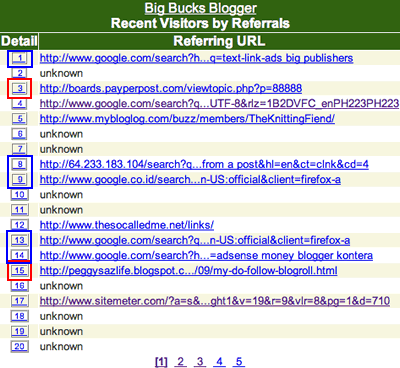
Frankly, I’m very happy to get that traffic.
Nevertheless, there is no point in deceiving myself into believing visitor #15 was likely to click on an ad. They probably wouldn’t because:
- Most dofollow visitors are uninterested in ads associated with my blog niche. Period. At my knitting blog, I’m pretty darn sure practically no one visiting from the dofollow list is fascinated with knitting; these people aren’t clicking ads to buy yarn.
- The “dofollow” visitors are not in an ad clicking mood.
The second point is actually the more important of the two.
Think about this: When people decide to use their dofollow blog rolls, they are focused on reading posts, thinking up a fairly relevant comment and dropping a link to their blog. Generally speaking, they aren’t going to do anything to distract them from the task at hand which is visiting a bunch of blogs and leaving a bunch of links.
They don’t click links in ads.
There are other sources of traffic that is fairly unlikely to convert to links: People who you asked to visit and click your Digg button. People who clicked signature links at webmaster forums; they are curious but often aren’t all that interested in buying products in your niche. (I ask you, how many at webmaster forums are interested in knitting? I’m sure they didn’t click ads!)
Should you stop trying to attract “Dofollow” traffic?
Still, there is a very good reason to stay on dofollow lists, to visit appropriate forums and to at attract traffic even if it’s non-ad-clicking traffic. The fact is, if you write good content, some of this traffic will eventually result in “natural” traffic.
How? Well, even though I skim when I visit dofollow blogs, I also bookmark the blogs that contain content that interests me.
Later, I return and read more. Believe it or not, I’ve even written whole blog posts as a result of articles I wandered across on the dofollow list. I’m sure other people using the dofollow list do the same.
This means that if you write content that interests some visitors, you will find that eventually a few of the dofollow visitors will come back. Since many of those dofollow visitors are bloggers, they may even be inspired to write a post, link your blog and leave you a trackback.
This will increase your visibility with search engines and eventually bring in “natural” traffic. When that happens, your blog will see ad-click rates rise. This is because there is a certain category of visitors who click on ads at a higher than average rate.
Search Engine Visitors Click Ads
Yes, visitors doing searches tend to click on ads. Not only are they interested in your topic, they are interested right now. After all, if they just Googled for advice on “topic X” , you can be pretty sure they are on a mission to learn more about “topic X”. That means they are fairly likely to click an ad about “topic X”.
Now, you have visitors how are in the mood to click ads and you will start to make money. And what was the secret?