I’ve moved on to other things. These plugins are no longer supported. I’ve updated L’s Linky Love for WP 2.3. Sort of. It turned out the plugin already worked for WP 2.3. However, I did make a two mods at user request: If you’d like the new version, download Linky Love for WP 2.3. Unzip. Place in plugin folder. Deactivate the old version, activate this one. If you notice any problems, let me know so I can fix. A word or caution I’m planning a tool to help us find these things months later, “just in case”, but haven’t thought through the best way to do it yet. Meanwhile, be very vigilant about trackback spam. When in doubt delete. I found a bug in “Hide Sponsored Categories Plugins” for 2.3. It only happens for categories that have apostrophe’s in their name. I have such a category. It’s the one for “L’s Linky Love!” So, I’m currently running the old version. Needless to say, I’ll be fixing that bug!
Update
Article

Trackback spam can be particularly pesky. I have seen a rash of semi-innocent looking scraper blogs that post snippets of your content. I call these Daegan Spam. If you keep those trackbacks and visit later, you will notice the blogs get redirected to irrelevant thin-affiliate sites for commercial products. This causes you to link into a “bad neighborhood”, which is a bad thing. In the “irony” department
Archive for the ‘My Plugins’ Category
L’s Linky Love for WP 2.3: Option to follow trackback immediately.
Wednesday, October 31st, 2007Hide Sponsored Categories for WP 2.3
Monday, October 29th, 2007I updated Hide Sponsored Categories plugin to run with WP 2.3. I’ve been running the updated version for a week here at this blog (which still uses WP 2.2). I also tested it at my test blogs, one of which runs on WP 2.2; one runs on WP 2.3.
What’s “Hide Sponsored Categories” used for?
The main use is to permit bloggers to place all sponsored posts in categories like “PPP”, “ReviewMe”, “Smorty”, “Sponsored Reviews”, “Loud Launch” and etc, but not display those labels publicly. Using these categories is convenient for bloggers, but displaying them violates Pay Per Post Best Practices.
So, by using the plugin, you can have convenience and still conform to best practices. You can create private “meta-categories” that don’t display but which are active for the purpose of:
- using the built-in WP search tool to find all “sponsored” posts when you, the blogger, are logged in and managing your blog.
- using “logic” to filter “sponsored” posts in some way. For example, you can use Kontera Control to keep Kontera ads out of sponsored posts while showing the ads in all other posts. You can use “No Old Spam Links” to “nofollow” all links in Sponsored Posts after your contractual obligation to follow has expired.
Due to changes in how WP handles categories, I had to make quite a few internal modifications. The new plugin should:
- Still work with WP 2.2, particularly when you call the categories using normally available template tags I checked the display with every default template provided by my installation of WP 2.2.
- Now work with widgeted sidebars; see the sidebar widget to the right? I only tested how widgets worked on two or three themes. (This should be enough, but if you have difficulties, let me know.)
- Works with WP 2.3. If you use WP 2.3 and widgets, use the widget to insert the custom functions. If you don’t use widgets, you must make replace the normal WP template tags found in sidebars with special purpose template tags. For your convenience, I described these in the user admin panel for the plugin.
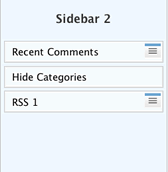
From the user point of view, the plugin mostly works the way the original one does; the user instructions are found in Hide Sponsored Categories.. That page still has the link to the old version- which doesn’t work for WP 2.3, and doesn’t work with widgets.
To get the new version, download this:
Hide Sponsored Categories
After one or two people use the new version and give me feedback, I’ll describe the new options in better detail and update all documentation.
Kontera Control for WP 2.3: Feel Free To Test!
Thursday, October 25th, 2007An updated version of Kontera Control for WP 2.3 is working on my two test blogs, my diet blog and here:
- Test blog 1: uses WP 2.2.3. I activated widgets on the sidebar, and it’s currently displaying the “Raindrops” theme.
- Test blog 2: uses WP 2.3; it’s currently displaying a weird version of my normal theme. (The oddities have nothing to do with the plugin.)
Notes:
Tricia had trouble with the version I emailed her. Maybe I attached something other than what I thought was the final version? (I sometimes click “save” and end up with extra copies in odd folders on my mac.) So to avoid issues with email snafus, I zipped the version that is actually running right here on my blog. You can down load by clicking Kontera Control for WP 2.3
To use: Download Kontera Control for WP 2.3, unzip. Upload to plugins. Deactivate old version of Kontera control. Activate this version. If you like, visit the Options page and adjust options. Look at blog to see if the plugin is working.
I think there should be no problems. However, until at least a few people other than me have tested, ya’ never know. If you experience any problems, please copy the error message and send it to me. The precise words in the gooble-dy-gook message help me. (Knowing there are no words helps too.)
After that, just deactivate this version and reactivate the old one.
Changes
Changes compared to old version:
- Fixed a bug that occurred when widgets were used. That bug made Kontera Control think posts were comments.
- Found a few formatting issues on the control page.