Archive for the ‘aLinks’ Category

ALinks NOT a memory Hog- usually!

Wednesday, August 8th, 2007

ALinks has been cleared! Sort of. (And, at least I think it’s cleared!)

The difficulty was mostly due to a bug in PHP 5.2.2. The bug causes WordPress’s xmlrpc.php file to break down. For some reason I don’t quite understand, aLinks uses the xmlrpc.php. (Why aLinks uses this is a mystery. )

The fix was easy. I added this line to the top of xmlrpc.php in my blog directory.

$HTTP_RAW_POST_DATA = file_get_contents("php://input");

By “top”, I mean I placed it immediately after the <?php. ( If you cut and paste from a blog, retype the double quotes. These are sometimes replaced with slightly different quotes which will not work. Just retype.)

I found both the solution and a description of the problem at hughesfamily.net.au and red-sweater.com.

Does this problem affect more than aLinks?

Yes. The ‘xmlrpc.php’ file contains some functions associated with pinging. So, if you are noticing difficulties receiving pings (which I was) you may be having problems with this file. (Presumably, my problems will be cured now.)

Do I have to fiddle with my xmlrpc.php file to fix the bug?

No. WP 2.2.2 includes the work around for the PHP 5.2.2 bug. When you upgrade, things will be fixed.

Thanks Lord Matt for noticing that aLinks was getting all bogged up trying to ping and ping and ping and…. Now I think I have the problem licked.
aLinks Plugin: memory hog!

Tuesday, August 7th, 2007

Drat! I love the functionality of aLinks. But today, the admin panel of my blog was running so slowly, I had to break down and communicate with Dreamhost about the slowness. After some discussion with them and some fiddling at my blogs, I concluded that aLinks plugin is a hog. (Needless to say, I breathed a sigh of relief to learn the problem was not one of my plugins!)

Evidently, aLinks not a cpu hog (that’s processing) it’s a memory hog. Or at least Dreamhost tells me my problem is memory.

The memory use issue is quite bizarre because the piggish behavior only happens when you are in the admin panel- that is when you write posts, publish, turn plugins on and off etc. It does not happen when the blog loads. (This means my visitors probably noticed nothing.)

When I finally turned off the plugin, my admin panel loaded quickly. The blog always loaded quickly.

I love the functionality of the aLinks. I looked at the calls, and I suspect the program can be salvaged fairly easily by making it do what it does much less frequently. (As in: do whatever it’s doing when the blogger makes changes at aLinks itself or possibly when the blogger publishes a post rather than every time we turn on any random plugin, edit our themes etc. There is no reason aLinks needs to do anything when I make a change to my style sheet! )

Because I love the functionality of the plugin, I’ll be communicating with the plugin developer. Meanwhile, if you are using ALinks, I advise you turn aLinks off. (Sigh. . . I make good money from Amazon using the auto-linking feature of that plugin. )

aLinks Plugin & Clickbank: Create Affiliate Links

Tuesday, July 10th, 2007

Clickbank is an affiliate program with lots of high-commission products you can advertise on your blog. Alinks is a WordPress plugin that can make it easy to drop “auto-links” to the high commission products. I told Jude I’d explain how to use both together.

I’ll assume you know how to install a plugin, and then give a detailed explanation of what to do. So, go get aLinks and the aLinks module for clickbank. Install and activate aLinks. Unzip the aLinks Module for Clickbank and leave that somewhere easy to find on your computer.

So, you’ve installed aLinks and activated, right?

Now, here’s how to create an auto-link to a Clickbank product.

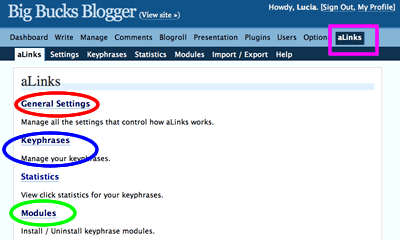
First, go to the administration area in WordPress. You click “aLinks” to open the aLinks administration screen. It will look
sort of like this:

Alinks control Screen

Next, click “modules”. That will open a screen that looks sort of like this: (more…)