I updated Hide Sponsored Categories plugin to run with WP 2.3. I’ve been running the updated version for a week here at this blog (which still uses WP 2.2). I also tested it at my test blogs, one of which runs on WP 2.2; one runs on WP 2.3.
What’s “Hide Sponsored Categories” used for?
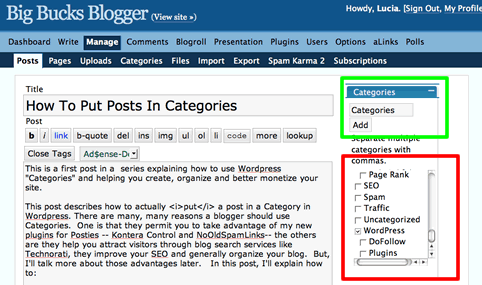
The main use is to permit bloggers to place all sponsored posts in categories like “PPP”, “ReviewMe”, “Smorty”, “Sponsored Reviews”, “Loud Launch” and etc, but not display those labels publicly. Using these categories is convenient for bloggers, but displaying them violates Pay Per Post Best Practices.
So, by using the plugin, you can have convenience and still conform to best practices. You can create private “meta-categories” that don’t display but which are active for the purpose of:
- using the built-in WP search tool to find all “sponsored” posts when you, the blogger, are logged in and managing your blog.
- using “logic” to filter “sponsored” posts in some way. For example, you can use Kontera Control to keep Kontera ads out of sponsored posts while showing the ads in all other posts. You can use “No Old Spam Links” to “nofollow” all links in Sponsored Posts after your contractual obligation to follow has expired.
Due to changes in how WP handles categories, I had to make quite a few internal modifications. The new plugin should:
- Still work with WP 2.2, particularly when you call the categories using normally available template tags I checked the display with every default template provided by my installation of WP 2.2.
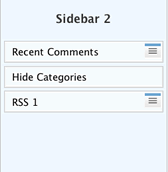
- Now work with widgeted sidebars; see the sidebar widget to the right? I only tested how widgets worked on two or three themes. (This should be enough, but if you have difficulties, let me know.)
- Works with WP 2.3. If you use WP 2.3 and widgets, use the widget to insert the custom functions. If you don’t use widgets, you must make replace the normal WP template tags found in sidebars with special purpose template tags. For your convenience, I described these in the user admin panel for the plugin.
From the user point of view, the plugin mostly works the way the original one does; the user instructions are found in Hide Sponsored Categories.. That page still has the link to the old version- which doesn’t work for WP 2.3, and doesn’t work with widgets.
To get the new version, download this:
Hide Sponsored Categories
After one or two people use the new version and give me feedback, I’ll describe the new options in better detail and update all documentation.