Archive for the ‘WordPress’ Category

Six Reasons I Won’t Cloaks Nofollows so Only Google Sees Them.

Tuesday, October 30th, 2007

Recently, Sebastian suggested that paid link sellers could switch their business model by secretly no following links. That is, making the paid links look like they “follow” except when viewed by Google’s spiders. These type of links would be called “cloaked nofollows”.

As it happens, I thought about this strategy way back when I wrote How To Cloak Nofollows on Individual WordPress Articles. Sebastian’s article discussed the “pro” side of this cloaking nofollows on paid links. I’m going to discuss the “cons”.

But first, a bit of nuts and bolts.

Is it possible to cloak nofollows?!

Absolutely! It is entirely possible to deliver one page to the Googlebot and another to human visitors. I discuss how to deliver cloaked nofollow entire pages in How To Cloak Nofollows on Individual WordPress Articles. Should you wish to delve deeper into the subject; I recommend reading Sebastian’s and Tellin’ Ya’s articles.

If you were to want to cloak nofollows with WordPress, you would likely do it using a plugin you could use as linkbait, right?

Here are 6 reasons why I wouldn’t write a plugin to cloak nofollowed paid links!

(more…)

Dofollow is a great way to get GREAT comments: Vapid videos attract smegma.

Monday, October 29th, 2007

Recently, Shoemoney blogger Pamcakes recorded a video in which she says the dofollow movement a “became a blogroll circle jerk” of brandnew or low quality blogs “dragging on for months”, announced that Greg Bozer is setting up a dofollow list for ‘quality’ blogs, and then tells us she’s “looking forward to the follow on blogposts where people tell us how much more time people have spent moderating after removing nofollow from their comments”.

What is Pam’s evidence that the dofollow movement is a blogroll circle jerk? Or that the dofollow blogs will have trouble with spam? Eyerolls.

Still many bloggers read Shoemoney; many might ask: Are dofollow blogs poor quality? Brandnew? Full of spammy comments?

If so, why is the dofollow movement gaining popularity? And, more importantly, why do I run across so many good dofollow blogs?!

Obviously, just as there are poor “dofollow” blogs; there are also loads of poor “nofollow” blogs. There are brand new dofollow blogs; there are tons of brand new “nofollow” blogs. What of it?

But the insinuation that dofollow disproportionately attracts spam is just flat out, wrong.

The reality is Dofollow often raises the level of comments.

How does dofollow raise the level of comments?

(more…)

Hide Sponsored Categories for WP 2.3

Monday, October 29th, 2007

I updated Hide Sponsored Categories plugin to run with WP 2.3. I’ve been running the updated version for a week here at this blog (which still uses WP 2.2). I also tested it at my test blogs, one of which runs on WP 2.2; one runs on WP 2.3.

What’s “Hide Sponsored Categories” used for?

The main use is to permit bloggers to place all sponsored posts in categories like “PPP”, “ReviewMe”, “Smorty”, “Sponsored Reviews”, “Loud Launch” and etc, but not display those labels publicly. Using these categories is convenient for bloggers, but displaying them violates Pay Per Post Best Practices.

So, by using the plugin, you can have convenience and still conform to best practices. You can create private “meta-categories” that don’t display but which are active for the purpose of:

  • using the built-in WP search tool to find all “sponsored” posts when you, the blogger, are logged in and managing your blog.
  • using “logic” to filter “sponsored” posts in some way. For example, you can use Kontera Control to keep Kontera ads out of sponsored posts while showing the ads in all other posts. You can use “No Old Spam Links” to “nofollow” all links in Sponsored Posts after your contractual obligation to follow has expired.

Due to changes in how WP handles categories, I had to make quite a few internal modifications. The new plugin should:

  • Still work with WP 2.2, particularly when you call the categories using normally available template tags I checked the display with every default template provided by my installation of WP 2.2.
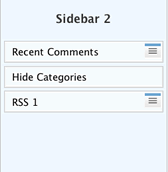
  • Widget of Hide Sponsored Categories

  • Now work with widgeted sidebars; see the sidebar widget to the right? I only tested how widgets worked on two or three themes. (This should be enough, but if you have difficulties, let me know.)
  • Works with WP 2.3. If you use WP 2.3 and widgets, use the widget to insert the custom functions. If you don’t use widgets, you must make replace the normal WP template tags found in sidebars with special purpose template tags. For your convenience, I described these in the user admin panel for the plugin.

From the user point of view, the plugin mostly works the way the original one does; the user instructions are found in Hide Sponsored Categories.. That page still has the link to the old version- which doesn’t work for WP 2.3, and doesn’t work with widgets.

To get the new version, download this:
Hide Sponsored Categories

After one or two people use the new version and give me feedback, I’ll describe the new options in better detail and update all documentation.