Archive for the ‘Plugins’ Category

Andy Beard Wants Dramatic Titles: Just Like Muhamed Saleem’s.

Wednesday, September 26th, 2007

Andy Beard is hankering for titles like Muhammad Saleem uses to lure in StumbleUpon traffic:
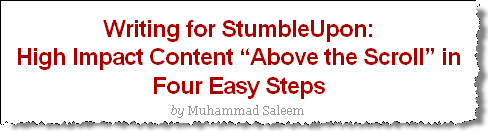
Muhammad Saleem’s Title

Notice the title is centered, and there is a break after the colon?

I suspect it can be done with CSS, but I’m wretched at that. So, I wrote a plugin called Nifty Titles. :)

Other features

  1. Doesn’t add the break in the feed. (Or at least it didn’t at my test blog.)
  2. Only shows in the page title.
  3. As far as I can tell, doesn’t screw anything up.
  4. Right now breaks on the “:” only. I could code a “candy” to give authors more control and/or permit breaking on “?”.

Will this lure in StumbleUpon Traffic? Tell me what you think.

—-
Note: After clicking publish, I notice this does something ugly in the admin panel. That will be easy to fix in the morning. In the meantime, if you have suggestions about breaking on “?” or “!” or anything else, let me know. It’s easy to do.


Update: I modified to a) fix the ugliness in the admin panel, add a after the first “:”, “?” or “!” but only break if there are at least 20 characters before the punctuation. (I want something easy to use that doesn’t ever look stupid.)

The Secret to Organizing Posts while Complying with PPP Best Practices

Wednesday, September 12th, 2007

PayPerPost announced a their new “Best Practices” which includes not putting posts in separate categories.

Ok, but now what are you going to do? After all, using the “search by category” function on the admin side of your blog helps you easily track of all your paid posts to make sure you got paid, delete if they are rejected, and edit if you are asked to do so.

But now, you can’t let the categories show on the outside of your blog.

Well, the answer is use Hide Sponsored Categories Plugin!

This plugin will:

  1. Let you create and use WordPress categories for organizational purposes on the admin side of your blog while
  2. Not having categories on the public visible side of your blog.

This should fulfill the PPP best practices rule because the purpose of that rule is to avoid public displaying of a category that contains a series of posts like this: Paid Post - Paid Post - Paid Post -….- Paid Post - Paid Post - Paid Post. Advertisers don’t like those.

As long as there is no such public category, no-one one cares if you have things conveniently organized on the admin side! To learn more and download the plugin, visit Hide Sponsored Categories Plugin.

Login Lockdown! Keep WordPress Safe.

Wednesday, August 29th, 2007

Michael VanDeMar of Bad Neighborhood blog brings us a new plugin to keep our hackers from login into word press. Login Lockdown will monitor how many times a person tries to log in during a short period of time (say 5 times in 3 minutes). If they exceed some key number, LogInLock down will lock them out from logging for some period of time; the default is one hour. Times and number of tries are adjustable.

Because I write a one person blog and rarely travel, I’m going to continue to protect by limiting access to those using my ISP using .htaccess. But I’ll be testing out the Log In Lock Down in parallel.

One additional feature I might suggest Michael add is automatically sending emails to the blog owner when someone does try to log in too often. The email would alert users to hacking attempts; it might be nice to know about those. Then we might be able to take measures to identify the hackers IP and block them.

Do use something to protect you blog!

If you haven’t protected through .htaccess, you should strongly consider installing this new plugin now. It sounds like just the thing for many bloggers.