Dear New StumbleUpon Friend:
You “discovered” my post. Thanks!
Now, I want to read and Stumble your blog posts. But I need to find your blog first, and you don’t make it easy for me to find your blog. Please plaster your blog url in as many places as possible in your Stumble profile so I can find you even if it’s 6 am and I’m brain dead.
How to make it easy for anyone to find your blog on your Stumble Profile.
- Visit your Stumble Upon Home page. Select the “Home” tab, then scan the top bar and click “Preferences”. Your preference page will appear.
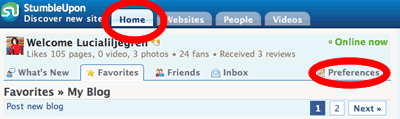
- Fill out your personal information. Ok, you did that already. Who forgets that?
- Don’t forget to click your “public profile.” I circled the link in the image below. Click that link; it’s the most useful bit.

- Add your blogs’ urls to “Introduce Yourself”. Find these two boxes:
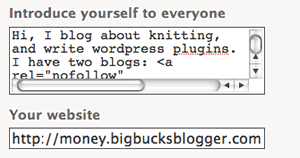
Add content that describes yourself and — this is important- include the links to your blogs both in the “introduce yourself” box and the “your blog” box.
- Click “View your plog as others see It” on the right column. You’ll now see that your blog url’s are on your “favorites” page (which everyone sees). The links are also on the “About” page.
Now, even a hurried, brain dead blogger who likes to visit blogs of people who “discovered” her posts can find your blog. (And she likes to Stumble. So, you’ll get traffic.  )
)
This entry was posted
on Wednesday, October 3rd, 2007 at 8:24 am and is filed under Blogging, Social Networking, StumbleUpon.
You can follow any responses to this entry through the RSS 2.0 feed.
You can leave a response, or trackback from your own site.
Thanks for posting this. I’ve been using StumbleUpon for a while now and never thought to add my blogs to it. Good advice.
Hehe I could have done with this post a long time ago! Only last week did I finally figure out how to add my blog URL, they should make it a bit more obvious!
One thing that I’ve also been getting into the habit of now, is sending people a quick message to say thanks when they give me a thumbs up - and I stick the URL at the end of that too.
[...] join StumbleUpon. Install the toolbar. Make a decent profile. Apply a few of my [...]
Hehe I just figured out how to do this the other day.