Here’s a new plugin to help you make even more money (and better organize your categories and tags.)
The plugin is called “Hide Sponsored Categories”, and the main way this plugin helps you make money is as follows:
It permits you to hide your “sponsored” category, so that you can take Pay Per Post Opps from advertisers whow don’t want you to display any in post sponsorship. Meanwhile, you can still use the “sponsored” category to control Kontera ads using Kontera Control.
To use this plugin, you’ll need to download the HideSponsoredCategories Plugin, upload and install it in your plugins directory. Activate.
Next, visit your WordPress management area, and click “Options” and then click “HideSponsoredCategories”. You’ll see a user interface that looks like this, but showing your categories:
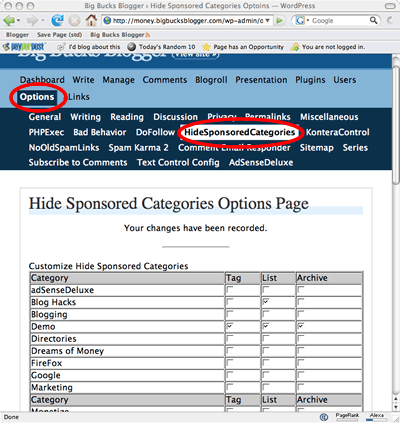
Next to each category, you will find three check boxes that let you prevent the category from appearing in one of three areas on your blog. These areas are: 1) The category tags, 2) The category list and 3) The category archives.
Let me explain what clicking each box does.
Tag:
Most wordpress templates are designed to display every category associated with a post somewhere inside the post content. On mine, you’ll see the tags in a list sort of like this:

The words “Monetize” and “Clickbank” act as “tags” telling social networking services like Technorati this post has something to do with “Monetize” and “Clickbank”. I often see visitors arriving at my site after searching for specific tags at Technorati. For that reason, it’s useful to create and use lots of descriptive tags.
Now, the problem: As a postie, I put my sponsored posts in a “Sponsored” category. Some advertisers won’t let me take the ads if the word “Sponsored” appears in the post.
Now, of course, I could just not create a sponsored category, but if I didn’t I wouldn’t be able to use neat tools like “Kontera Control” to keep the Kontera ads out of my post! And I make money with Kontera ads.
So, the more profitable solution is to create the category but prevent it from displaying.
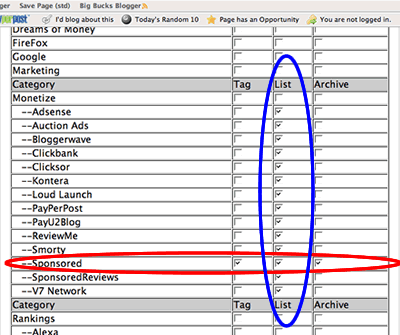
So, to fix that, I write “HideSponsoredCategories”, installed and activated. Now I check the “tag” box next to “Sponsored”, and the word “Sponsored” will no longer appear in the list of tags in any of my sponsored post.
Archives
Now, some advertisers go further. They don’t want their ad to appear in a “sponsored” archive. Basically, they don’t want Google to see this post sitting on a page chock full of sponsored posts. They figure this will hurt their SEO (and they are probably right.) You may also hurt your own Googlerank by creating a paid-for-post full archive the search engines can spider!
So, both for the benefit of all your sponsors and yourself, you’ll want to make that archive disappear. To do that, check the box for “Archive”. That will make your archives for “Sponsored” post vanish! If someone tries to guess this archive’s url and enters it, WordPress will find nothing. Sort of like this:
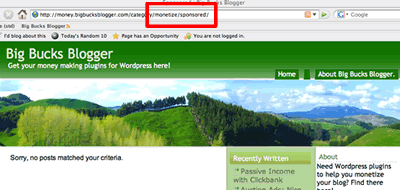
In principle, checking those two boxes is enough to ensure you can take an Opp that specifies “no in post sponsorship”. However, you’ll also want to check the “list” box. That will cause the “Sponsored category to disappear from your list of categories. Why display it if clicking just results in a a “Sorry no posts” message?
List
As long as I was writing this plugin, I added another convenient feature. As I mentioned, it’s wise to tag your posts. I tag them with nearly any interesting feature a reader might want to read about. The words “kontera”, “adsense”, “pay per post” tend to draw in visitors. So, if my post touches on those topics, I tag them.
However, because I’ve created so many categories, my blog sidebar has become cluttered with a zillion categories. But, by checking the “list” box, I was able to make these categories vanish from the side bar. Compare the list to the left- as it appeared before I checked a bunch of “list” boxes, to the one on the right:
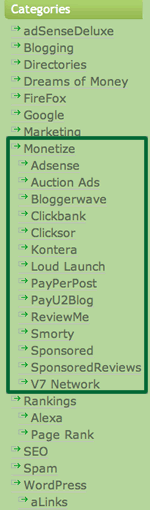
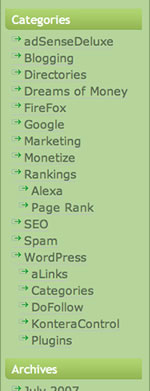
Now, that I’ve checked a whole bunch of “list” checkboxes, I can “tag” my articles with SEO rich descriptive terms words like “Kontera” or “Adsense”, there by communicating the tag to Technorati. I can also maintain the “Kontera” archive- thereby letting visitors and search engine spiders find all the articles on Kontera. But, I don’t need to maintain a super cluttered sidebar.
I bet you want to download this plugin and use it, right? Here you go:
Now install it and make some money!
Note: This plugin uses a function called “get_categories()” which exists only in WP newer than 2.1.
No one commented yet??? Huh? Ok well I will. I’m going to download this and give it try later today as I’m getting Kontera started on my site. I’ll be using your other plugin as well.
I was just wondering - I use simple tags. I’m not sure what tagging system you used when you made this plugin. Hopefully it works with simple tags. I also use a tag cloud on several of my sites that is created using simple tag. I’m hoping that I can also hide a sponsored or review category from the tag cloud.
Actually … if it doesn’t hide it from the tag cloud I just thought of a work around. I just won’t use whatever keyword I want to blog in the tag area. I’ll only use it as a category.
This is going to be a lot of work for me setting up Kontara and the plugins. Back in Feb when PPP changed their system I created new categories and started my tag cloud. I went over everything on my sites to see what I really talked about most often. The tag clouds really help me see that at a glance.
I’ve never really used a sponsored category but I did mark a lot of the posts review in the past. I stopped doing that in February though and even went back several months and removed that category from a lot of my paid posts. Now I’m going to have to go back in and give the last several months of paid posts a specific category again. What a mess!
I just wanted to let you know that the web files has been working properly ever since I opened and resaved that one post. All clear.
I’ve also just written a post about your plugins and how I’m using them with Kontera. It’s not posted yet but likely will be within the next 6 hours.
Hey - you mentioned something about weblog using CPU resources - can you get back to me on that. I still have CPU resource problems according to my host.
Thanks!
Great plugins! I’m going to download and use them. I’m wondering if something like the Kontera Control would work with google ads that are in the post?
I actually got here roaming around trying to figure out how to block google ads from review posts.
Thanks for your great work!
Okay installed this plugin too, although in the options under this plugin there are no categories displayed to check, mmm I need to see what is happening.
I deactivated a plugin I use to put my categories in a drop down menu and had them listed in sidebar but still none show up to check in your plugin screen.
What versions of WordPress should be used with this plugin?
Excellent - this plugin is exactly what I was looking for and I am very grateful to you for developing it. I preferred to leave sponsored posts uncategorized, and of course I have removed that title from the list using your plugin. But do you know if there is a way to remove the ‘filed under’ wording from certain posts?
This is actually handy for archiving categories that don’t involve sponsorship. Very handy!
I know, I’m redeveloping a blog, but I don’t want to delete all the old posts or categories, so this was a perfect way to display only the new categories.
This plugin is awesome!
I tired it on both blogs in case it was a theme issue but still not showing check boxes to hide categories.
[...] Hide Sponsored Categories [...]
Its working correctly on my blog, and I have latest copy of WP.
[...] Well, the answer is use Hide Sponsored Categories Plugin! [...]
This works great!! Thanks a lot!
This is exactly what I needed.
I’m using WP 2.2.3 btw.
I love this plug in. I was however disappointed when I updated to WP 2.3 Beta 3 and realized it wasn’t hiding the categories.
I started to look at your code to see if I could find what I needed to do to make it compatible, but then I realized I suck with PHP, with that being said if you’ll email me, I can give you the database structure, and sample data from the new tables.
I just put this on my blog and while it’s working for the tag and list options, but not for the archive option. Since I have the ‘sponsored’ category ticked all three options, then trying to load http://blog.peculiarplace.com/category/sponsored/ should get the “nothing here to find” message you mention above, however I’m getting the archive.
On Another blog it works perfectly so I’m thinking it might be something to do with how the theme I’m using is coded (http://www.onehertz.com/portfolio/wordpress/royale/)
If you (or anyone really) could give me a clue how to get it working I’d be grateful
Thanks
Does this work for WP 2.3?
does not seem to work with wordpress 2.3
I’m just checking for updates on all my plugins. I haven’t upgraded to WP 2.3 yet but I’m preparing to. What versions are all your plugins at now. This post doesn’t say the version number and I think I’ve got one of the first versions that you came out with. LOL 0.1
[...] of view, the plugin mostly works the way the original one does; the user instructions are found in Hide Sponsored Categories.. That page still has the link to the old version- which doesn’t work for WP 2.3, and [...]
Installed this plugin but I’m wondering why sponsored posts are still showing up on my sponsored category page category/sponsored. I have all 3 boxes checked for my sponsored category. Any help would be great.