October 5th, 2007
Today, we are actually going to import the Blogger Blog to Wordpress! Those wishing to transfer from Typepad etc. can read this and figure out how to do that too.
Preliminaries:
This post assumes you have already 1) created a hosting plan, 2)Installed Wordpress, and now have a useless empty Wordpress blog installed on your site.
That means you are ready to import your Blogger blog. To avoid a little confusion later, I advise logging into your Google account before we begin.
 Now, visit your Wordpress blog by entering it’s url. If you didn’t change themes, your Wordpress installation resembles the one to the left. I didn’t tell you to log in an fiddle with themes, but I bet you did. That’s ok.
Now we’re all set.
Login to Your Wordpress Administration Panel & Get to the Import Screen
Now, you will want to login. Most likely, your blog theme will have a “login” button somewhere on the sidebar, click that. If not, you need to tack-on “/wp-admin” to your blog url and if you aren’t logged in, you will be asked to log in. Enter your username (which, I bet is still “admin”) and password (which was set for you when you installed WP.) Click to log in.
You will now arrive at the Administration screen; the top two bands of the dashboard will look the illustration shown below. There are a number of choices including “Dashboard”, “Write” etc. Click “Manage”. This will change the second line, and you will now see an option called “Import”. Click that.
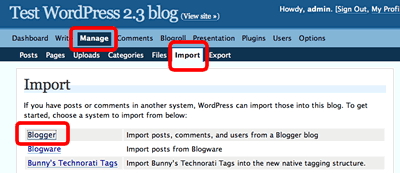 Read the rest of this entry »
Posted in Blogger, WordPress | 2 Comments »
October 4th, 2007
Helio of Goteborg’s History wrote asking me how to get more links for his Swedish history page. I’ll admit I’m not an expert, but my last name sounds scandinavian, so I’m motivated to give a nice Swede the few tips I know. The first tips applies to non-English language bloggers, but read generally, the other five apply to everyone.
Here goes:
- Provide content in English. Blogging in Swedish limits your readership and linkage; English is much more widely spoken and understood.
A number of translation plugins exist for Wordpress. I haven’t tried them; maybe I should. You definitely should!
Polyglot is a Wordpress plugin can help you provide content in a variety of languages, but you need to supply the content in both languages. Unfortunately, writing copy in both English and Swedish is work. Try robo-translation using Word Translation Plugin; it’s free. If free doesn’t work, you can pay for Angsumans’ Översättare Plugg Pro 4.0 Befriaren also known as “Angsuman’s Translator Plugin Pro 4.0 Released”.
Read the rest of this entry »
Posted in Blogging, SEO, Social Networking, StumbleUpon, Traffic | 6 Comments »
October 3rd, 2007
Dear New StumbleUpon Friend:
You “discovered” my post. Thanks!
Now, I want to read and Stumble your blog posts. But I need to find your blog first, and you don’t make it easy for me to find your blog. Please plaster your blog url in as many places as possible in your Stumble profile so I can find you even if it’s 6 am and I’m brain dead.
How to make it easy for anyone to find your blog on your Stumble Profile.
- Visit your Stumble Upon Home page. Select the “Home” tab, then scan the top bar and click “Preferences”. Your preference page will appear.
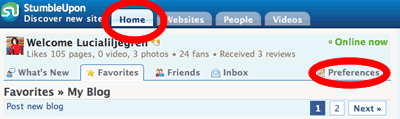
- Fill out your personal information. Ok, you did that already. Who forgets that?
- Don’t forget to click your “public profile.” I circled the link in the image below. Click that link; it’s the most useful bit.

- Add your blogs’ urls to “Introduce Yourself”. Find these two boxes:

Add content that describes yourself and — this is important- include the links to your blogs both in the “introduce yourself” box and the “your blog” box.
- Click “View your plog as others see It” on the right column. You’ll now see that your blog url’s are on your “favorites” page (which everyone sees). The links are also on the “About” page.
Now, even a hurried, brain dead blogger who likes to visit blogs of people who “discovered” her posts can find your blog. (And she likes to Stumble. So, you’ll get traffic.  )
)
Posted in Blogging, Social Networking, StumbleUpon | 4 Comments »