Kontera Control for WP 2.3:
Feel Free To Test!
Feel Free To Test!
An updated version of Kontera Control for WP 2.3 is working on my two test blogs, my diet blog and here:
- Test blog 1: uses WP 2.2.3. I activated widgets on the sidebar, and it’s currently displaying the “Raindrops” theme.
- Test blog 2: uses WP 2.3; it’s currently displaying a weird version of my normal theme. (The oddities have nothing to do with the plugin.)
- Neglected diet blog: uses 2.1.2, with no widgets.
Notes:
Tricia had trouble with the version I emailed her. Maybe I attached something other than what I thought was the final version? (I sometimes click “save” and end up with extra copies in odd folders on my mac.) So to avoid issues with email snafus, I zipped the version that is actually running right here on my blog. You can down load by clicking Kontera Control for WP 2.3
To use: Download Kontera Control for WP 2.3, unzip. Upload to plugins. Deactivate old version of Kontera control. Activate this version. If you like, visit the Options page and adjust options. Look at blog to see if the plugin is working.
I think there should be no problems. However, until at least a few people other than me have tested, ya’ never know. If you experience any problems, please copy the error message and send it to me. The precise words in the gooble-dy-gook message help me. (Knowing there are no words helps too.)
After that, just deactivate this version and reactivate the old one.
Changes
Changes compared to old version:
- Fixed a bug that occurred when widgets were used. That bug made Kontera Control think posts were comments.
- Found a few formatting issues on the control page.

Related Posts:
- Kontera Control Being Updated: Would you like me to test with your theme?
- No Old Spam Links Plugin Updated: Can it salvage PR?
- Andy Beard Wants Dramatic Titles: Just Like Muhamed Saleem's.
- The Secret to Organizing Posts while Complying with PPP Best Practices
Comments
Kontera Control for WP 2.3: Feel Free To Test! was posted on October 25, 2007 - Filed Under My Plugins KonteraControl |Blog Security: htaccess block
Reading Matt Cutts blog, I got a chuckle when I read a blog security tip I’d been using at my knitting blog for two years. Evidently, the tips is news to SEO blogging types? 
(Which maybe means if you get your security tips from knitting blogs, you an avoid getting hacked the way Greywolf was in January of 2007?)
Anyway, since I know this can happen to anyone, I’m going to describe what the hackers do, and then describe two things you can do to increase security against these hacking attempts.
One will require you to deal with ‘.htaccess’ manually, but results in the most convenient set up while working at home. The other involves using a brand new plugin available at Ask Apache. That plugin is almost perfect. However, it could be improved. Because I got an error when trying to leave comments at “Ask Apache”, I’m going to suggest improvements to the plugin. (The developer asked!)
If he or she takes the suggestions to heart, this will be a truly awesome plugin. (It’s already very useful.)
So, now onto the meat of the article.
What do hackers do?
Click here to read more.
Related Posts:
- Don't Get Hacked: Google Bot Trick!
- Here Are Two Quick Ways to Catch Cloaked Nofollows
- Login Lockdown! Keep Wordpress Safe.
- What makes an A-list blogger?
Comments
Blog Security: htaccess block was posted on August 16, 2007 - Filed Under Blogging Blog Hacks Plugins WordPress |Blog Layout Tips: What’s above the fold?
Tip: The best template layouts show the most important content above the fold. Examine your blog and edit to make sure yours does that.
Define “Above the fold”.
There is no firm definition of “above the fold”. People with larger screens see more; people with smaller screens see less. I consider “shows at the top of the Wordpress preview pane without scrolling” to be “above the fold.”
Here’s a screen shot of one of my recent blog posts:
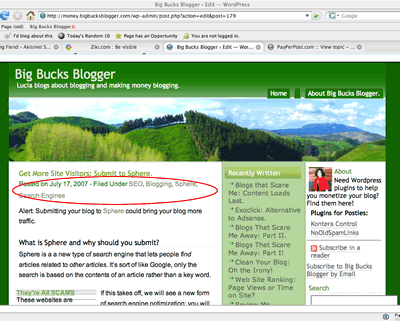
Does the important stuff show?
Each blogger has their own opinion about what’s “important.” At my blog, I think showing at least a few lines of content is very important: People should not need to scroll to read the first few lines of content. I think showing adSense is somewhat important: If the first few lines of content don’t interest the reader, I’d like them to click the ads!
Viewing that post, I decided that I needed to shift the Google ads up a bit.
I also saw something I consider unimportant showing in my content area: both the date or categories will fulfill their purpose if they appear below the fold.
If I shift those, there may b some hope my content will capture a new visitor’s interest or, failing that, cause them to click on a pay per click ad before they need to decide whether to scroll or hit the back button.
Could I Make Additional Improvements?
Of course! There is no such thing as “the perfect template”. Anyway, I haven’t begun to evaluate my sidebars yet; they are atrocious. I’ll be editing those soon!
Tags:adsense blog blog design blogging layouts template
Related Posts:
- Don't let your layout break: Look at posts with minimum font size turned off.
- Who doesn't want to improve their blog? The Blog Improvement Zone Meme.
- Blog Design Bloopers: More Content Loads Last
- Blog Security: htaccess block
Comments
Blog Layout Tips: What’s above the fold? was posted on July 24, 2007 - Filed Under Template Blog Design Blogging WordPress |older posts »
