Upgrading a Blogger Blog To Wordpress, Lesson IV
Today, we are actually going to import the Blogger Blog to Wordpress! Those wishing to transfer from Typepad etc. can read this and figure out how to do that too.
Preliminaries:
This post assumes you have already 1) created a hosting plan, 2)Installed Wordpress, and now have a useless empty Wordpress blog installed on your site.
That means you are ready to import your Blogger blog. To avoid a little confusion later, I advise logging into your Google account before we begin.
 Now, visit your Wordpress blog by entering it’s url. If you didn’t change themes, your Wordpress installation resembles the one to the left. I didn’t tell you to log in an fiddle with themes, but I bet you did. That’s ok.
Now we’re all set.
Login to Your Wordpress Administration Panel & Get to the Import Screen
Now, you will want to login. Most likely, your blog theme will have a “login” button somewhere on the sidebar, click that. If not, you need to tack-on “/wp-admin” to your blog url and if you aren’t logged in, you will be asked to log in. Enter your username (which, I bet is still “admin”) and password (which was set for you when you installed WP.) Click to log in.
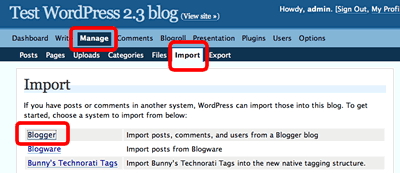
You will now arrive at the Administration screen; the top two bands of the dashboard will look the illustration shown below. There are a number of choices including “Dashboard”, “Write” etc. Click “Manage”. This will change the second line, and you will now see an option called “Import”. Click that.
Click here to read more.
Tags:blogger import blogger blog to Wordpress WordPress
Related Posts:
- No Old Spam Links Plugin Updated: Can it salvage PR?
- Kontera Control Being Updated: Would you like me to test with your theme?
- How to Install Wordpress: Upgrading a Blogger Blog to Wordpress for Beginners, III
- Upgrading a Blogger Blog to Wordpress for Beginners; Lesson I
Comments
Upgrading a Blogger Blog To Wordpress, Lesson IV was posted on October 5, 2007 - Filed Under WordPress |Exoclick + Adsense Deluxe= Easy Money.
Monday, I told you about Exoclick, a pay-per-click (PPC) program matches ads to key words a blogger selects. Both John Chow and I think that for some bloggers, this program may be more profitable than contextual programs like AdSense or Kontera.
To maximize profits on PPC ads, you need to place them in profitable locations. But many bloggers have difficulty positioning them in the high profit spots. Today, I’m going to show you how easy it can be to insert Exoclick ads or into your blog content where the click rate is high. I use this same easy method to insert AdSense and Auction Ads (but it’s doesn’t quite work for Clicksor.)
Notice how I am inserting my PayPerClick ads near the second paragraph of text? That’s where people who read the first paragraph and decided not to read further are very likely to click. Those clicks earn big bucks. They could help you make money online too!
How to Insert PPC Ads in Content With Ease!
You can insert ExoClick ads in just a four easy steps! And “four steps” includes signing up with Exoclick! After you insert your first ad, inserting later ads will require only one easy step!
Here are the steps:
Click here to read more.
Related Posts:
- Eliminate Duplicate Content: Canonical URL Fixer Plugin.
- Does Google Page Rank Foster an Attitude of Entitlement? Alternate view to Wendy Piersal's Post.
- Upgrading a Blogger Blog To Wordpress, Lesson IV
- Andy Beard Wants Dramatic Titles: Just Like Muhamed Saleem's.
