The Secret to Organizing Posts while Complying with PPP Best Practices
PayPerPost announced a their new “Best Practices” which includes not putting posts in separate categories.
Ok, but now what are you going to do? After all, using the “search by category” function on the admin side of your blog helps you easily track of all your paid posts to make sure you got paid, delete if they are rejected, and edit if you are asked to do so.
But now, you can’t let the categories show on the outside of your blog.
Well, the answer is use Hide Sponsored Categories Plugin!
This plugin will:
- Let you create and use WordPress categories for organizational purposes on the admin side of your blog while
- Not having categories on the public visible side of your blog.
This should fulfill the PPP best practices rule because the purpose of that rule is to avoid public displaying of a category that contains a series of posts like this: Paid Post - Paid Post - Paid Post -….- Paid Post - Paid Post - Paid Post. Advertisers don’t like those.
As long as there is no such public category, no-one one cares if you have things conveniently organized on the admin side! To learn more and download the plugin, visit Hide Sponsored Categories Plugin.
Tags:HideSponsoredCategories monetize My Plugins PayPerPost plugins WordPress
Related Posts:
- Hide Sponsored Categories Plugin
- Andy Beard Wants Dramatic Titles: Just Like Muhamed Saleem's.
- Lucia's Linky Love: New Features Available.
- Linky Love Update Testing: Please Leave Comments.
Comments
The Secret to Organizing Posts while Complying with PPP Best Practices was posted on September 12, 2007 - Filed Under HideSponsoredCategories My Plugins PayPerPost Monetize Plugins WordPress |Ultimate Tag Warrior: A plugin that rocks!
I installed The Ultimate Tag Warrior. I can now:
- Get more blog traffic and improve SEO. How? I can easily make my articles appear in loads of Technorati tag searches. I can also inform search engines know this article is “about” a tagged topic.
- Tempt visitors to stay longer. How? By posting an auto-magically created “related articles” list at the bottom of each blog post.
Thank you to Tricia and Andy Beard who both told me of this plugin.
Is “The Ultimate Tag Warrior” compatible with “Hide Sponsored Categories” and “Kontera Control?”
When I was writing “Hide Sponsored Categories”, Tricia asked me how my plugin would interact with “The Ultimate Tag Warrior”.
Before I answer that, I bet some of you are wondering, what are “Hide Sponsored Categories” and “Kontera Control?” They are two complimentary tools I consider to be “Plugins for Posties!” Click here to read more.
Kontera control lets posties keep Kontera Ads out of PPP articles — thus making you more money.
Related Posts:
- The Secret to Organizing Posts while Complying with PPP Best Practices
- Want Traffic? Create Something Unique and Valuable!
- Hide Sponsored Categories Plugin
- "The Tampon Blog" MEETS Blogrush Quality Standards?!
Comments
Ultimate Tag Warrior: A plugin that rocks! was posted on July 26, 2007 - Filed Under My Plugins HideSponsoredCategories KonteraControl SEO |Hide Sponsored Categories Plugin
Here’s a new plugin to help you make even more money (and better organize your categories and tags.)
The plugin is called “Hide Sponsored Categories”, and the main way this plugin helps you make money is as follows:
It permits you to hide your “sponsored” category, so that you can take Pay Per Post Opps from advertisers whow don’t want you to display any in post sponsorship. Meanwhile, you can still use the “sponsored” category to control Kontera ads using Kontera Control.
To use this plugin, you’ll need to download the HideSponsoredCategories Plugin, upload and install it in your plugins directory. Activate.
Next, visit your Wordpress management area, and click “Options” and then click “HideSponsoredCategories”. You’ll see a user interface that looks like this, but showing your categories:
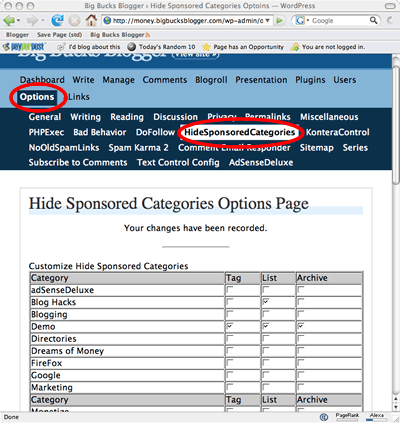
Next to each category, you will find three check boxes that let you prevent the category from appearing in one of three areas on your blog. These areas are: 1) The category tags, 2) The category list and 3) The category archives.
Let me explain what clicking each box does.
Click here to read more.
Related Posts:
- The Secret to Organizing Posts while Complying with PPP Best Practices
- Andy Beard Wants Dramatic Titles: Just Like Muhamed Saleem's.
- Ultimate Tag Warrior: A plugin that rocks!
- How to Actually Use Kontera Control
