Two Ways To Hide Your Secrets from Google (and Everyone).
You don’t have any secrets? No secret nude photos directory? No directory of your plots to take over the universe? No . . . Wordpress plugins that scream “I post paid links?”
Well, remember that there are people who like to report paid links to Google’s snitch service. Some may know enough to load your plugin folder by typing http://yourpaidlinkblog.com/wp-content/plugins/ into their browser.
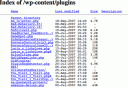 If they do, will they see a list of all your plugins?
What’s bad about letting Google snitches see this list?
Well, if you’ve got the “wrong” kind of plugin, the snitch may report you to Google for taking paid posts! (And the snitch is probably correct about the paid links. After all, why else have you installed AutoPaidLinkInsertion.php? )
Google may or may not spank your Page Rank for this, but your advertisers would probably prefer Google didn’t know you were selling paid ads. (And hey, who knows? If the word gets out, some advertisers may start checking your plugins folder to figure out if Google is likely to know you are a link farm. Hiding this list could mean more money for you.)
So, maybe you’d like to prevent snoops and snitches from seeing that list of files?
Here are two easy ways to do it:
- Upload an index.html file to wp-content/plugins. This will hide that file list in /wp-content/plugins. However, you may need to repeat this when you upgrade Wordpress. Also, you won’t hide the listing in any other folders. That may not bother you- unless you are storing something you’d rather keep under wraps.
- Add one or two lines to the .htaccess file. Modifying .htaccess in the root directory can keep snoops from viewing listings in every directory on your site. If you think these snoops don’t exist, read Voyeur Heaven, which I discovered while Stumbling. Obviously, people snoop for many reasons including industrial espionage, curiosity, and, a desire to find porn.
How to modify the .htaccess file
Now, visit your web site using ftp. Find the ‘.htaccess’ file; the ‘dot’ in front is important. Now insert these two lines at the end of the file.
#prevent people from viewing directory listings
Options -Indexes
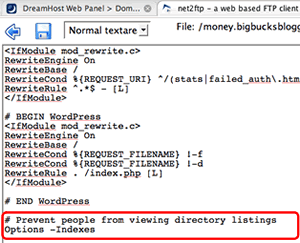 The first line is an optional comment. The second line prevents people from reading the list of all files when a directory that doesn’t include ‘index.php’ or ‘index.html’ file.
Now, save. Then visit your blog to make sure the blog loads. If it doesn’t, fix the .htaccess file immediately.
You’re done!
From now on, no-one can surf google for ‘index.php’ and discover stuff you might not wish them to see. Click to see how well it worked for me. http://money.bigbucksblogger.com/wp-content/plugins/.

Related Posts:
- Five Ways Google Should Know My Posts Do NOT Contain Paid Links
- Google Adsense Videos: I'm giving it a try!
- Useless Link Detector: Is it useful?
- Eliminate Duplicate Content: Canonical URL Fixer Plugin.
Boost sales by blogging
 : Click to learn how to create and effective business blog.
Comments
Two Ways To Hide Your Secrets from Google (and Everyone). was posted on September 28, 2007 - Filed Under Google |Block Spammers From Your Trackbacks
Blogs that monetize frequently find themselves unders attack by both comment and trackback spammers. Some of these spammers are stalkers, some are weirdos so obessed with paid posts they hit the bloggers site over and over and over to "punish" them for their paid posts.
Theresa of Scribble Scratch recently described the symptoms at the postie board.
- In 48 hours, Theresa got 300 comment spams that hit only PPP posts.
- The 'comments' come through the trackback links. (That would be wp-trackback.php .)
- The direct visits to the trackback links leave proxy IPs.
What can you do? Well, of course, you should already be using Akismet, BadBehavior and Spam Karma; those will block a lot of spam. But sometimes even those don't work completely. Both Tricia and Theresa notice some of this is flying past Bad Behavior. You can also use WP-Ban to ban certain IP's after that IP spamming.
But what happens when they change IP addresses?Here's a suggestion thatmight work.
My suggestion is based on a trick I learned fromSpamHuntresses' who blocks trackback spam .htaccess. She described how to do it for WP 1.5; I modified her method make it work for me, and to also catch the spammers using proxy servers. (I've also left Spamhuntress a question because I think we can block even more spam if we add a few more lines.)
Anyway, give this a try because it may do the trick:- Visit your blog's WP directory. Find the .htaccess file. (It will have a '.' in front of htaccess. There should already be one because WP creates one. The '.' sometimes makes that file invisible, so if you can't see it, contact your host and ask them to adjust that for you.
- Important:Make a backup in case things go horribly wrong. (They shouldn't.) I named mine htaccessBackup.
- Edit your .htaccess file by cutting and pasting the text in the box below. (After pasting, make sure all quotes are straight up and down normal ones. They should be-- I've blocked WP's auto-formatting in this article.)
- Save the new .htaccess file. Check that your blog loads. If it does, you are finished. If your blog doesn't replace the edited file with your backup!
So, how does this block spam?
Well... no. Nothing can block everybit of trackback spam. But here is what it will block:- It prevents anyone using a browser to get to wp-trackback.php. That file called to leave trackback spam-- and it appears in my logs when I get a trackback. Trackbacks shouldn't be left by browsers-- but many spammers give it a try.
- It prevents anyone from accessing wp-trackback.php through a proxy server.
What else could be done?
SpamHuntress's original code had a line like this "<Files trackback>" which I replaced with "<Files wp-trackback.php>". The reason I did that is that <Files trackback> never blocked the spam for me. What I've found is that the set up she described blocked browsers from accessing addresses like this:
http://money.bigbucksblogger.com/trackback/
But not this:
http://money.bigbucksblogger.com/the_file_name/trackback/
And since my trackbacks look like the latter, not the former, her method didn't help me. But using <Files wp-trackback.php> did help me -- so it might help you.
Anyway, if you are having trouble with trackback spam, give my code a try. If it doesn't work for you, maybe we'll get lucky and someone who understands .htaccess a bit better can tell us how to fix the code and make it work for everyone. (Also, if it turns out the spam comes through pingbacks, we'll need to hunt down another solution. )
Meahwhile, good luck! 
Related Posts:
- Blog Security: htaccess block
- What makes an A-list blogger?
- Useless Link Detector: Is it useful?
- Six Ways to Get More Links: Tips for a Niche Blog.
ClickBank Buddy: Rotates Text Ads to Clickbank
Comments
Block Spammers From Your Trackbacks was posted on September 13, 2007 - Filed Under Spam Blogging |Blog Security: htaccess block
Reading Matt Cutts blog, I got a chuckle when I read a blog security tip I’d been using at my knitting blog for two years. Evidently, the tips is news to SEO blogging types?
(Which maybe means if you get your security tips from knitting blogs, you an avoid getting hacked the way Greywolf was in January of 2007?)
Anyway, since I know this can happen to anyone, I’m going to describe what the hackers do, and then describe two things you can do to increase security against these hacking attempts.
One will require you to deal with ‘.htaccess’ manually, but results in the most convenient set up while working at home. The other involves using a brand new plugin available at Ask Apache. That plugin is almost perfect. However, it could be improved. Because I got an error when trying to leave comments at “Ask Apache”, I’m going to suggest improvements to the plugin. (The developer asked!)
If he or she takes the suggestions to heart, this will be a truly awesome plugin. (It’s already very useful.)
So, now onto the meat of the article.
What do hackers do?
Click here to read more.
Related Posts:
- Don't Get Hacked: Google Bot Trick!
- Here Are Two Quick Ways to Catch Cloaked Nofollows
- Login Lockdown! Keep Wordpress Safe.
- What makes an A-list blogger?
Contexual Clickbank Ads: Software to create passive income.

 stuff
stuff