Upgrading a Blogger Blog To Wordpress, Lesson IV
Today, we are actually going to import the Blogger Blog to Wordpress! Those wishing to transfer from Typepad etc. can read this and figure out how to do that too.
Preliminaries:
This post assumes you have already 1) created a hosting plan, 2)Installed Wordpress, and now have a useless empty Wordpress blog installed on your site.
That means you are ready to import your Blogger blog. To avoid a little confusion later, I advise logging into your Google account before we begin.
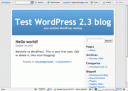 Now, visit your Wordpress blog by entering it’s url. If you didn’t change themes, your Wordpress installation resembles the one to the left. I didn’t tell you to log in an fiddle with themes, but I bet you did. That’s ok.
Now we’re all set.
Login to Your Wordpress Administration Panel & Get to the Import Screen
Now, you will want to login. Most likely, your blog theme will have a “login” button somewhere on the sidebar, click that. If not, you need to tack-on “/wp-admin” to your blog url and if you aren’t logged in, you will be asked to log in. Enter your username (which, I bet is still “admin”) and password (which was set for you when you installed WP.) Click to log in.
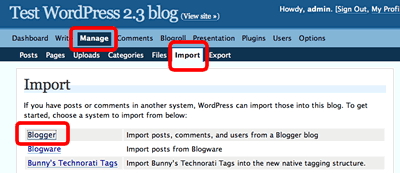
You will now arrive at the Administration screen; the top two bands of the dashboard will look the illustration shown below. There are a number of choices including “Dashboard”, “Write” etc. Click “Manage”. This will change the second line, and you will now see an option called “Import”. Click that.
Click here to read more.
Tags:blogger import blogger blog to Wordpress WordPress
Related Posts:
- No Old Spam Links Plugin Updated: Can it salvage PR?
- Kontera Control Being Updated: Would you like me to test with your theme?
- How to Install Wordpress: Upgrading a Blogger Blog to Wordpress for Beginners, III
- Upgrading a Blogger Blog to Wordpress for Beginners; Lesson I
