Blog Layout Tips: What’s above the fold?
Tip: The best template layouts show the most important content above the fold. Examine your blog and edit to make sure yours does that.
Define “Above the fold”.
There is no firm definition of “above the fold”. People with larger screens see more; people with smaller screens see less. I consider “shows at the top of the Wordpress preview pane without scrolling” to be “above the fold.”
Here’s a screen shot of one of my recent blog posts:
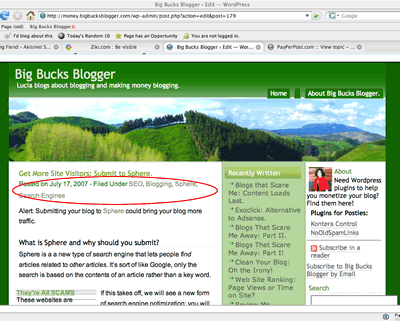
Does the important stuff show?
Each blogger has their own opinion about what’s “important.” At my blog, I think showing at least a few lines of content is very important: People should not need to scroll to read the first few lines of content. I think showing adSense is somewhat important: If the first few lines of content don’t interest the reader, I’d like them to click the ads!
Viewing that post, I decided that I needed to shift the Google ads up a bit.
I also saw something I consider unimportant showing in my content area: both the date or categories will fulfill their purpose if they appear below the fold.
If I shift those, there may b some hope my content will capture a new visitor’s interest or, failing that, cause them to click on a pay per click ad before they need to decide whether to scroll or hit the back button.
Could I Make Additional Improvements?
Of course! There is no such thing as “the perfect template”. Anyway, I haven’t begun to evaluate my sidebars yet; they are atrocious. I’ll be editing those soon!
Tags:adsense blog blog design blogging layouts template

Related Posts:
- Don't let your layout break: Look at posts with minimum font size turned off.
- Blog Design Bloopers: More Content Loads Last
- Blog Security: htaccess block
- More Money: AdBrite + AdSense Deluxe

 stuff
stuff