Two Ways To Hide Your Secrets from Google (and Everyone).
You don’t have any secrets? No secret nude photos directory? No directory of your plots to take over the universe? No . . . Wordpress plugins that scream “I post paid links?”
Well, remember that there are people who like to report paid links to Google’s snitch service. Some may know enough to load your plugin folder by typing http://yourpaidlinkblog.com/wp-content/plugins/ into their browser.
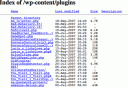 If they do, will they see a list of all your plugins?
What’s bad about letting Google snitches see this list?
Well, if you’ve got the “wrong” kind of plugin, the snitch may report you to Google for taking paid posts! (And the snitch is probably correct about the paid links. After all, why else have you installed AutoPaidLinkInsertion.php? )
Google may or may not spank your Page Rank for this, but your advertisers would probably prefer Google didn’t know you were selling paid ads. (And hey, who knows? If the word gets out, some advertisers may start checking your plugins folder to figure out if Google is likely to know you are a link farm. Hiding this list could mean more money for you.)
So, maybe you’d like to prevent snoops and snitches from seeing that list of files?
Here are two easy ways to do it:
- Upload an index.html file to wp-content/plugins. This will hide that file list in /wp-content/plugins. However, you may need to repeat this when you upgrade Wordpress. Also, you won’t hide the listing in any other folders. That may not bother you- unless you are storing something you’d rather keep under wraps.
- Add one or two lines to the .htaccess file. Modifying .htaccess in the root directory can keep snoops from viewing listings in every directory on your site. If you think these snoops don’t exist, read Voyeur Heaven, which I discovered while Stumbling. Obviously, people snoop for many reasons including industrial espionage, curiosity, and, a desire to find porn.
How to modify the .htaccess file
Now, visit your web site using ftp. Find the ‘.htaccess’ file; the ‘dot’ in front is important. Now insert these two lines at the end of the file.
#prevent people from viewing directory listings
Options -Indexes
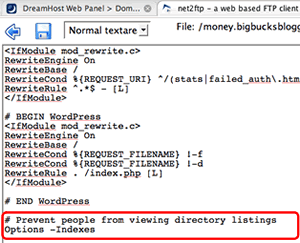 The first line is an optional comment. The second line prevents people from reading the list of all files when a directory that doesn’t include ‘index.php’ or ‘index.html’ file.
Now, save. Then visit your blog to make sure the blog loads. If it doesn’t, fix the .htaccess file immediately.
You’re done!
From now on, no-one can surf google for ‘index.php’ and discover stuff you might not wish them to see. Click to see how well it worked for me. http://money.bigbucksblogger.com/wp-content/plugins/.

Related Posts:
- Five Ways Google Should Know My Posts Do NOT Contain Paid Links
- Google Adsense Videos: I'm giving it a try!
- Useless Link Detector: Is it useful?
- Eliminate Duplicate Content: Canonical URL Fixer Plugin.
Lucia's Linky Love: dofollow plugin

 stuff
stuff