Five Ways Google Should Know My Posts Do NOT Contain Paid Links
Google seems to be stomping on the blogs carrying paid posts. I think in many respects they appear to be making mistakes and lowering ranks of posts that searchers find valuable; in that regard, Google may be cutting off its nose to spite its face. After all, if a high Google PR becomes un-correlated with “trustworthiness” from the user’s standpoint, and Google still gives “low PR” sites high ranks for competitive search results, who will believe the toolbar PR tell us anything about worth or trust?
Still, to protect my highly coveted PR of 0, I’d like to tell Google how they can tell my blog is not chockfull of what they consider to be paid links.
So, to help Google out, I’ll list five features that indicate “no paid link” with near certainty; others are just “strong hints”. Here go:
- Google Adsense in post content: The TOS of most paid posting companies and link selling services generally forbid inserting Adsense in the content of a paid post. Adsense, Adbrite, or obvious banner ads in content means no paid links. (Of course, normal visitor know these are only here to make me money. But whatever.)
- Kontera Ads appear in content after five days. The TOS of most paid posting companies and link selling services generally forbid inserting contextual ads by Kontera, Intellitext or any other service. If you see these in a post, you can bet dollars to donuts there are no paid links.
- Links to a several domains in one post. The TOS of most paid posting companies forbid adding links to anyone other than the paying customer. If I link to Sebastian , Sephy, WebGrrrl, Steve Cronin, Untwisted Vortex, Blog-op, Great Video Clips and Re-emergence, I may have linked for no other reason than because they appear in my Bumpzee widget, but you can be sure they didn’t pay me. (Meanwhile, as I write, I noticed Slevi stopped by.)
- Not an un-ending series of 50 word long posts. The TOS of several companies require 50 words surrounding that dropped link. Others require interim posts with at least 50 words. Loads and loads of 50 word posts often mean lots of paid links. Few generally means no paid posts- though there are exceptions.
- Few inexplicably link to words having nothing to do with the main topic. Like… for example, “mail boxes”. Ok, I just threw that one in after I intentionally visited a blog that I know works for PayU2Blog. The blogger seems to believe those links “blend”.
But, I ask you: Who links the word “mail boxes”? Ok, I could see linking it if you’d just finished an arduous day of shopping for mailboxes, and found an online source. But who links it in an article about- hypothetically- taking her daughter to the ER, and having to deal with doctors bills? PayU2Bloggers do, that’s who!
There’s an incomplete list for Google. I’m sure anyone who visits can now see that I don’t run paid links!
As an added benefit, I bet I’ve opened the Google engineers’ eyes and they’ll now get cracking on new algorithms based on my incomplete list.
Oh… you think engineers with Ph. D.s working on this issue might have figured these five signs out already? I have a Ph.D. in engineering too! And guess what? I think except for precious few bloggers, I’m pretty sure Google already knows how to find most paid links using an algorithm.
That’s why I’m wondering why they keep yammering on and on about how we should add “rel=nofollow”. Sorry, but, can’t you tell?!
Could paid links be made non-obvious? Yep. I don’t happen to run them, mostly because my blog launched after the last toolbar Pagerank update which means no one wants to pay me to linke them. But you know what? If the SEO’s go underground, the way Michael Gray suggest they will, Google will have a very hard time finding paid links.
What’s even more true is this: If Google doesn’t figure out how to detect underground paid links algorithmically they will never detect them manually. Cuz’ let’s face it: Ain’t no-one ever gonna “nofollow” those links!
Tags:google paid links
Related Posts:
- Two Ways To Hide Your Secrets from Google (and Everyone).
- Google Adsense Videos: I'm giving it a try!
- Useless Link Detector: Is it useful?
- Eliminate Duplicate Content: Canonical URL Fixer Plugin.
knitting blog: The Knitting Fiend
Comments
Five Ways Google Should Know My Posts Do NOT Contain Paid Links was posted on October 9, 2007 - Filed Under Links Blogging Monetize |Two Ways To Hide Your Secrets from Google (and Everyone).
You don’t have any secrets? No secret nude photos directory? No directory of your plots to take over the universe? No . . . Wordpress plugins that scream “I post paid links?”
Well, remember that there are people who like to report paid links to Google’s snitch service. Some may know enough to load your plugin folder by typing http://yourpaidlinkblog.com/wp-content/plugins/ into their browser.
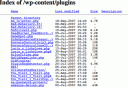 If they do, will they see a list of all your plugins?
What’s bad about letting Google snitches see this list?
Well, if you’ve got the “wrong” kind of plugin, the snitch may report you to Google for taking paid posts! (And the snitch is probably correct about the paid links. After all, why else have you installed AutoPaidLinkInsertion.php? )
Google may or may not spank your Page Rank for this, but your advertisers would probably prefer Google didn’t know you were selling paid ads. (And hey, who knows? If the word gets out, some advertisers may start checking your plugins folder to figure out if Google is likely to know you are a link farm. Hiding this list could mean more money for you.)
So, maybe you’d like to prevent snoops and snitches from seeing that list of files?
Here are two easy ways to do it:
- Upload an index.html file to wp-content/plugins. This will hide that file list in /wp-content/plugins. However, you may need to repeat this when you upgrade Wordpress. Also, you won’t hide the listing in any other folders. That may not bother you- unless you are storing something you’d rather keep under wraps.
- Add one or two lines to the .htaccess file. Modifying .htaccess in the root directory can keep snoops from viewing listings in every directory on your site. If you think these snoops don’t exist, read Voyeur Heaven, which I discovered while Stumbling. Obviously, people snoop for many reasons including industrial espionage, curiosity, and, a desire to find porn.
How to modify the .htaccess file
Now, visit your web site using ftp. Find the ‘.htaccess’ file; the ‘dot’ in front is important. Now insert these two lines at the end of the file.
#prevent people from viewing directory listings
Options -Indexes
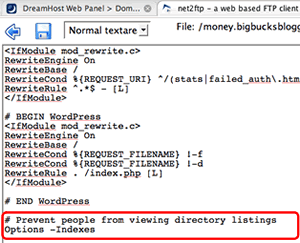 The first line is an optional comment. The second line prevents people from reading the list of all files when a directory that doesn’t include ‘index.php’ or ‘index.html’ file.
Now, save. Then visit your blog to make sure the blog loads. If it doesn’t, fix the .htaccess file immediately.
You’re done!
From now on, no-one can surf google for ‘index.php’ and discover stuff you might not wish them to see. Click to see how well it worked for me. http://money.bigbucksblogger.com/wp-content/plugins/.
Tags:google htaccess paid blogging paid links security
Related Posts:
- Five Ways Google Should Know My Posts Do NOT Contain Paid Links
- Google Adsense Videos: I'm giving it a try!
- Useless Link Detector: Is it useful?
- Eliminate Duplicate Content: Canonical URL Fixer Plugin.
Boost sales by blogging
 : Click to learn how to create and effective business blog.
 stuff
stuff