Six Ways to Get More Links:
Tips for a Niche Blog.
Tips for a Niche Blog.
Helio of Goteborg’s History wrote asking me how to get more links for his Swedish history page. I’ll admit I’m not an expert, but my last name is “Liljegren”, so I’m motivated to give a nice Swede the few tips I know. The first tips applies to non-English language bloggers, but read generally, the other five apply to everyone. Here goes: A number of translation plugins exist for Wordpress. I haven’t tried them; maybe I should. You definitely should! Polyglot is a Wordpress plugin can help you provide content in a variety of languages, but you need to supply the content in both languages. Unfortunately, writing copy in both English and Swedish is work. Try robo-translation using Word Translation Plugin; it’s free. If free doesn’t work, you can pay for Angsumans’ Översättare Plugg Pro 4.0 Befriaren also known as “Angsuman’s Translator Plugin Pro 4.0 Released”.
Tags:backlinks blogging linky love seo Social Networking StumbleUpon traffic

Related Posts:
- Five Tips for Getting Traffic From Stumble
- Seven Ways to Drive Web Traffic: Wall Street Journal
- What makes an A-list blogger?
- Useless Link Detector: Is it useful?
 : Affiliate marketing has made others rich. Cick to learn how you can too.
Seo Software: Get A Top 5 Google Ranking In Under 30 Days!
Comments
Six Ways to Get More Links: Tips for a Niche Blog. was posted on October 4, 2007 - Filed Under StumbleUpon Social Networking Blogging Traffic SEO |Help me Stumble YOU: Add your URL to your profile.
Dear New StumbleUpon Friend: Now, I want to read and Stumble your blog posts. But I need to find your blog first, and you don’t make it easy for me to find your blog. Please plaster your blog url in as many places as possible in your Stumble profile so I can find you even if it’s 6 am and I’m brain dead. Now, even a hurried, brain dead blogger who likes to visit blogs of people who “discovered” her posts can find your blog. (And she likes to Stumble. So, you’ll get traffic.
You “discovered” my post. Thanks!How to make it easy for anyone to find your blog on your Stumble Profile.
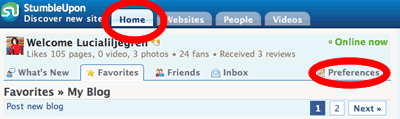
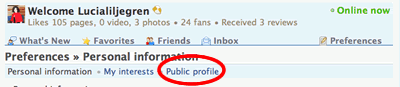
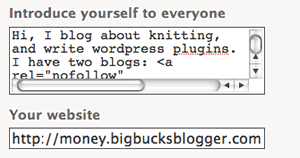
Add content that describes yourself and — this is important- include the links to your blogs both in the “introduce yourself” box and the “your blog” box.  )
)
Related Posts:
- StumbleUpon: Powerful Pulse!
- The Real Secret: Write about StumbleUpon?!
- Six Ways to Get More Links: Tips for a Niche Blog.
- Want a thumbsdown from a Stumbler? Create a blinking banner demanding a thumbs up!
ClickBank Buddy: Rotates Text Ads to Clickbank
Comments
Help me Stumble YOU: Add your URL to your profile. was posted on October 3, 2007 - Filed Under StumbleUpon Social Networking Blogging |Want a thumbsdown from a Stumbler?
Create a blinking banner demanding a thumbs up!
Create a blinking banner demanding a thumbs up!
Muhammad Saleem recently gave seven reasons for giving a thumbs-down at stumbleupon.
I thought his list was thorough until I came across this: A page that included a large blinking banner asking Stumblers for a thumbs up! Yes, that big red banner blink, blink, blink, blinks, blinks!
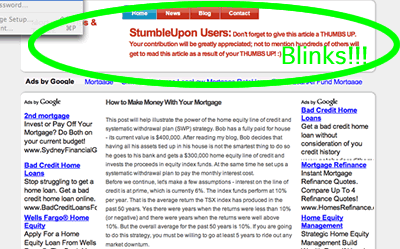
OMG! Talk about giving me a reason to vote thumbsdown!
Tags:Marketing Social Networking StumbleUpon
Related Posts:
- Six Ways to Get More Links: Tips for a Niche Blog.
- Five Tips for Getting Traffic From Stumble
- Help me Stumble YOU: Add your URL to your profile.
- Blogrush Spam. . . Sigh. . .
Need targeted traffic that converts?
: Click to learn how to use Adwords.Comments
Want a thumbsdown from a Stumbler? Create a blinking banner demanding a thumbs up! was posted on September 27, 2007 - Filed Under StumbleUpon Social Networking Marketing |older posts »

 stuff
stuff